

How To Calculate Pixel Density
Pixel density is at work whether you look at a billboard on your way to work or when you view a high-definition movie on your phone. An LED display’s sharpness and clarity depend critically on pixel density, often expressed in pixels per inch (PPI). Whether it’s a sleek interior monitor or a large outdoor screen, the way pixels are packed together directly determines how clear and vivid the pictures seem. Not only is knowing how to calculate pixel density important for engineers but also for everyone trying to maximize display quality.
This article will explain the principles of pixel density, why it is important for LED displays, and how to calculate pixel density. We will also discuss useful techniques for pixel density measurement and provide professional advice on appropriate PPI for different uses along the way. By the conclusion, you will know exactly how to strike the ideal mix between cost and quality for your next show production.
What Is Pixel Density?
Pixel density, or pixels per inch (PPI), is the secret ingredient that makes your screen seem crisp and colorful. Consider your display as a digital patchwork in which every pixel serves as a little patch. The image becomes more vivid and detailed the closer those patches are sewn together. In other words, what is pixel density? It is the ideal balance between screen size and resolution. View in 4K quality on a large TV; from across the room, it looks fantastic. But pack the same resolution into a smartphone, and you suddenly are seeing every detail, crisp, even up close.
Apple’s Retina Display, for example, claims roughly 326 PPI, which renders individual pixels almost undetectable at typical viewing range. Conversely, a 1080p TV could only score 50-60 PPI on a 55-inch screen, which would be ideal for your living room but not cut it if you were up close. Pixel density is about providing a clean, sharp vision, whatever you are, not about cramming in additional pixels.
How To Calculate Pixel Density
Though it seems difficult, learning how to calculate pixel density is simpler than you may expect. Pixel density, sometimes known as PPI, shows you how many pixels fill per inch of your screen. Why, then, does it matter? Your picture will seem sharper and clearer the more pixels you can pack into a limited area. Let’s dissect it into easy stages.
To compute PPI, we use the formula below:

Step 1: Start with the Resolution and Screen Size
Consider pixel density, which is similar to putting marbles into a box. Your pixels are the marbles; the box is your screen. Your image will be better if you accommodate more marbles without seeming squashed. Two elements are required to determine pixel density: the diagonal dimension in inches of your screen and its resolution—that is, the overall count of pixels both horizontally and vertically.
Suppose your screen has a 24-inch diagonal dimension with a 1920×1080 Full HD resolution. You square both numbers first:
19202 + 10802 = 4,147,200 + 1,166,400 = 5,313,600
Next, get the pixel diagonal resolution by first computing the square root:
5,313,600 ≈ 2,304
Finally, split that figure by the diagonal width of your screen:
2,304 ÷ 24 ≈ 96 PPI
Step 2: Why Aspect Ratio Is Like Fitting a Puzzle
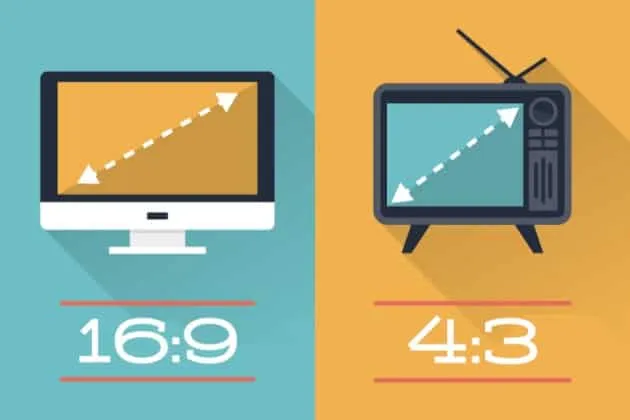
One often overlooked mistake is failing to consider the aspect ratio of the screen. Things do not line up exactly, much like attempting to fit a square peg into a round hole. Two displays with the same diagonal dimension but different aspect ratios—say, 16:9 vs 4:3—will disperse their pixels differently. While a 4:3 screen keeps things closer vertically, which might influence pixel density, a 16:9 screen extends objects more horizontally. Thus, always double-check the aspect ratio during computation.
Step 3: Avoiding Common Mistakes
One common error people make is substituting the width of the screen for its diagonal. That is like determining if a sofa would fit through a doorway by measuring its length. Another mistake? Overly early rounding of numbers. When working with high-end monitors like 4K or 8K, even minute pixel density mistakes may have a significant impact. To prevent surprises, keep your figures exact until the last stage.
Additional Considerations
One crucial point is that a higher or better PPI is not always required. Super high pixel density has no effect if you are erecting a massive billboard visible from across the street. It’s like trying on a meticulous makeup look for a Zoom call because, from that distance, nobody will notice. Every pixel matters, however, for smaller panels or anything seen up close—including a conference room display.
Thus, consider where and how the screen will be utilized while you are calculating pixel density. This lets you strike a mix between expense and clarity without going crazy.
Why Pixel Density Matters in LED Displays
Pixel density is more than just a number; it’s essential for making LED displays seem crisp, professional, and engaging. Done well, pixel density turns a screen from a simple communication tool into a potent visual medium that enthralls viewers. See your show as a puzzle. Small and many pieces—pixels—fit firmly together to create a smooth, cohesive picture. On the other hand, if the components are either too few or too big, gaps will appear, and the whole image will seem lacking. This is the reason pixel density is so important for LED display performance, especially in settings where visual impact rules everything.
The Role of Pixel Density in Different Environments
The effect of pixel density varies based on the kind of information being exhibited and how near viewers are to the display. Where people often stand only a few feet apart in retail outlets or event settings, the screen needs to provide sharp, clear images.
A high-density display guarantees that even the most minute elements—such as the texture of a cloth or the complex design of a good—are clear and vivid. A high-end watch merchant may, for instance, highlight close-up views of its timepieces using a 4K LED screen. Every tick of the second hand and every engraved feature on the watch face is crystal clear with a high pixel density, therefore underlining the brand’s dedication to accuracy and luxury.
On the other hand, in settings like outdoor billboards where spectators are far away, the necessary pixel density is less. Still, a careful balance has to be done even here. For viewers who happen to be closer than expected specifically, a billboard with inadequate pixel density may show big, blocky pixels that compromise the intended message.
How Pixel Density Enhances Customer Experience
High pixel density enhances the whole consumer experience rather than just improves images. A digital ad that catches your eye differs from one you pass by. Perfect-clarity pictures and videos on a screen captivate viewers, thereby motivating them to interact with the material. A high-density LED screen displaying dynamic images, for instance, might draw a crowd during a trade fair, therefore increasing the brand’s exposure and chances to interact with possible customers.
Beyond appearance, great pixel density improves reading. Text on high-density displays stays clear and readable even when seen from many directions or under varied lighting conditions. In places like conferences or airports, where fast, unambiguous communication is vital, this is especially important. Low pixel density displays may frustrate viewers by forcing them to squint or move closer to grasp the content, therefore detracting from the whole experience.
What Happens When Pixel Density Falls Short?
Insufficient pixel density has clear negative effects right away. Imagine strolling through a luxury mall and coming across a low-resolution LED screen with pixelated advertising. The message loses its power, and instead of being impressed, the defects of the show divert your attention. This not only damages the reputation of the sponsor but also calls badly on the mall itself.
Low pixel density may have even more major consequences in practical environments such as control rooms. Consider a security guard viewing low-density screen surveillance video. Important information, such as the face of a person or the license plate of a car, maybe too faint to distinguish, therefore compromising safety and judgment ability. In a medical environment, a low pixel density of an LED screen could hide important information in diagnostic pictures, hence producing erroneous evaluations.
The Upside of High Pixel Density
Now, let’s change the script. The effects are amazing when pixel density either reaches or surpasses the needed level. High-density screens provide virtually realistic degrees of detail, which enhances the immersive and interesting power of the material. This is the reason companies in sectors such as retail, digital advertising, and entertainment spend extensively on high-quality displays. High pixel density, for instance, may be used in a concert venue with a large LED background to provide visually arresting performances so even the crowd seated in the nosebleed can observe the act clearly and vibrantly.
Additionally, enabling greater creative versatility is high pixel density. Sharper screens allow companies to explore complex designs, realistic animations, and high-resolution video material free from concern about how they will show on the screen. For companies trying to distinguish out in cutthroat industries, where first impressions usually define consumer involvement, this adaptability is especially important.
Balancing Cost and Performance
Although increasing the initial cost of a display might result from increased pixel density, over time, the advantages usually exceed the cost. High-density displays are more relevant as they are better able to manage changing content needs, including higher-resolution video formats. Their improved return on investment (ROI) helps to lower the need for further displays or improvements as well. A retail establishment investing in a high-density LED panel, for example, could discover that it stays useful for years even as content needs become more complex.
Long-Term Impact on Brand Perception
Pixel density ultimately is an investment in the image of your business. A company that gives premium displays top importance makes it very clear: customer experience and detail are the first concerns. The correct pixel density supports professionalism and quality, whether it is for a premium retail business or a high-tech startup. These impressions create trust and loyalty over time, therefore keeping your audience interested and linked to your brand.
Ways To Optimize Pixel Density
Maximizing pixel density transcends just choosing the correct resolution for your screen. Advanced techniques provide excellent performance even in demanding surroundings by focusing on optimizing every pixel. Consider it like tweaking a high-performance sports vehicle.
Although the engine (resolution) might be strong, handling and speed would be much improved by fine-tuning the suspension, aerodynamics, and tires (advanced optimization methods). Likewise, cutting-edge technology and innovative techniques like AI-driven calibration assist LED displays in providing exceptional visual quality that fits their particular usage.
Precision Tailored for Your Screen Through AI-Driven Display Calibration
AI-driven display calibration is a novel method of pixel density improvement. For example, with one-size-fits-all presets on a camera, traditional calibration techniques depend on specified values. But artificial intelligence analyzes the special qualities of every display, and real-time parameter adjustment is akin to that of a bespoke tailor. Regardless of the screen’s resolution or surroundings, this might involve adjusting brightness, contrast, and color accuracy to guarantee every pixel functions as best it can.
In a retail environment with changeable lighting conditions, for instance, an AI-calibrated LED display may change its pixel output to preserve clean, vivid images all day. The AI learns and adjusts constantly, therefore guaranteeing that the display always looks its best without human interaction. By avoiding pixel burnout via usage, this degree of optimization not only improves visual quality but also increases the lifetime of the screen.
MicroLED Technology
Rising technologies like MicroLED will shape pixel density optimization going forward. MicroLEDs, unlike conventional LEDs, use tiny, self-emissive pixels devoid of a backlight, therefore providing a much greater pixel density. It’s like moving from standard bricks to precisely constructed tiles for your display to allow for more complex and seamless images. MicroLED technology is already being used in sectors like medical imaging and aeronautical simulations that need ultra-high-resolution screens.
Quantum dot technology—which improves color accuracy and brightness without raising power consumption—also shows great promise. Even in outdoor or high-ambiance-light conditions, quantum dots may provide unmatched picture quality when paired with high pixel density. Large-scale digital signs, where preserving visibility and clarity is absolutely vital, are thus perfect.
Dynamic Pixel Mapping
Another sophisticated method that best uses pixels depending on the presented information is dynamic pixel mapping. It works somewhat like how a GPS adjusts its path based on traffic conditions. Dynamic pixel mapping guarantees that more pixel resources are assigned to the moving visuals, hence boosting their clarity and lowering motion blur, even if a part of the screen displays stationary material and another shows a high-motion video.
This approach is especially helpful in multi-functional settings like control rooms or live event events where displays have to manage a combination of static and dynamic material concurrently. Dynamic pixel mapping guarantees that every area of the display offers maximum performance without compromising general efficiency by cleverly reallocating pixel resources.
AI and Machine Learning in Real-Time Optimization
Looking forward, pixel density optimization will be much enhanced by artificial intelligence and machine learning. Predictive algorithms might be used in future exhibits to forecast content demands and thereby modify pixel performance. Imagine an LED panel in a sports stadium that automatically increases pixel density in real-time regions where action is occurring to guarantee spectators see the best possible picture free from delays or distortions.
Additionally possible with these technologies is adaptive pixel density, in which displays actively change their PPI depending on the distance of the observer. This would maximize efficiency and minimize superfluous pixel use by allowing optimal visual clarity in both near and remote viewing circumstances.
Conclusion
Maximizing the visual performance of LED displays depends on a simple but crucial process: computing pixel density. Understanding the link between resolution and screen size can help you choose the pixels per inch (PPI) most appropriate for your use. This information guarantees better content, pictures, and an immersive viewing experience.
Advanced techniques like AI-driven calibration and dynamic pixel mapping further improve display performance, customizing to content and environmental changes in real-time. Offering unmatched accuracy and efficiency, emerging technologies like MicroLED and quantum dots challenge these limits even further. Learning pixel density helps you create displays that engage and successfully convey, whether your design is for retail, events, or mission-critical situations.



 English
  Russian
  Spanish
  Arabic
  German
  Korean
  French
  Portuguese
  Italian
  Persian
  Indonesian
  Turkish