

Picking the Best Dot Pitch for LED Displays
If you’re working on an LED wall project where you’d like to have the best image clarity in the optimal viewing distance, you need to choose the proper dot pitch. This choice greatly affects the display’s image quality and the visual experience offered to the viewers. In this post, we will explain what dot pitch is, define some of the terms you may come across, and give you an idea of how to choose the best dot pitch for your application.
What is Dot Pitch?
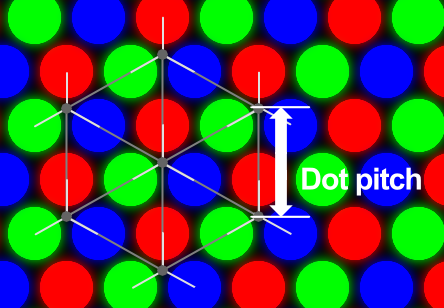
The distance between a pixel’s center and the center of its neighboring pixel is known as dot pitch or pixel pitch. Most often, millimeters are used to express it. An image can be formed with greater sharpness and detail the closer together the individual pixels are organized. As such, the most important parameter in determining an LED display’s quality is its dot pitch.
Why Dot Pitch Matters
Understanding dot pitch is essential for several reasons:
- Image Clarity: Lesser or finer dots per inch or dpi provide better picture quality. A small dot pitch is required for complex graphics that need to be closely viewed, such as in a control board or advertising space.
- Viewing Distance: The ideal dot pitch depends on the distance at which the display is to be observed. If the distance of the target audience from the display is significant, then you can get away with a larger dot pitch since the human eye cannot distinguish between the pixels at such distances.
- Cost Consideration: Smaller dot pitch costs more mostly because it means more pixels are crammed on the screen. Being aware of your requirements will allow you to fix a reasonable budget.
- Application Suitability: Different applications may need different dot pitches. For instance, a video wall that will be installed inside a shopping mall will need a different dot pitch than a billboard that will be placed outside.
How Dot Pitch Affects Display Performance
The dot pitch directly affects various aspects of how an image is rendered, which, in turn, influences the viewer’s experience. Here’s a detailed breakdown of the key performance factors affected by dot pitch:
1. Resolution

One of the most important factors to consider when evaluating the resolution of any LED display is the dot pitch. The sharpness of an image is defined by the number of pixels per inch or centimeter that an image holds and is otherwise referred to as the screen’s resolution. Pixels with a lower dot pitch are closer to one another and offer a higher pixel density per inch. This, in turn, offers more detailed pictures and also improves the level of resolution of an image. High-resolution screens with low dot pitch are essential in applications where the content demands high fidelity, such as:
- Intricate Graphics: Presentation that involves intricate graphics or text, 3D animations, or high-definition images should be accompanied by a small value of dot pitch.
- Tight Text: Text-heavy applications, such as those seen in control and conference centers, require smaller pixel pitches to ensure readability.
- Fine Patterns: Digital art displays or architectural renderings that contain fine patterns are usually depicted at a higher resolution for good results.
A high pixel density allows the viewers to have a fully immersive experience where they are almost touching the screen. This makes dot pitch choice and correct resolution crucial in ensuring your LED display produces sharp and detailed images.
2. Viewing Angle

Dot pitch may also influence the viewing angle that is available for an LED display. The viewing angle is defined as the maximum angle at which a display can be observed without compromising the visual quality of the image. The smaller size of the dots on the screen will, on most occasions, ensure better sharpness and better color reproduction across a wider angle. This makes them suitable for scenarios where:
- Wide Audience Viewing: Specifically, in large settings such as auditoriums, stadiums, or concert halls, most of the viewers may be watching the screen from different angles. A smaller dot pitch means that everyone who approaches the screen gets a bright and sharp display, no matter where he/she is seated.
- Public Information Displays: Displays installed in places such as airports, shopping malls, and other places where signs are expected to be viewed from various angles require a small dot pitch to have a consistent image quality.
- Exhibit and Trade Shows: In such environments where people will walk around the display looking from all possible sides, higher-density dot pitches offer a consistent end-user experience.
Smaller dot pitches ensure that the LED display does not drop in color or sharpness and is viewable from wider angles. This is especially the case in areas where content or branding messages have to be delivered to a spread-out audience.
3. Color Reproduction

The dot pitch of a display can affect its capability of reproducing colors. This is because the more dots are crammed into a specific area, the more accurate and refined the color gradients and transitions. This is especially important in applications that require:
- Branding Consistency: In the case of digital advertising it is essential to accurately represent color to ensure consistency in branding. High pixel density also means that the colors are rendered as faithful to the design as possible.
- Fine Art and Media: Artworks that are displayed in galleries, museums, or through multimedia forms require displays with accurate color reproduction.
- Virtual Reality (VR) and Augmented Reality (AR) Applications: In environments where displays are being used for VR and AR, accurate color matching helps to build up a much closer to real-life environment hence boosting the immersion.
Improved color gamut also leads to better contrast and contrast ratio, which is crucial for the depth and dynamism of an image or a video displayed.
4. Brightness and Contrast
Contrast and brightness are also important for display quality and define how well the screen can be seen under different lighting conditions. Dot pitch can affect the maximum achievable brightness and contrast:
- Higher Brightness Requirements: LED displays that are installed outdoors, or in places with high levels of ambient light require higher levels of brightness. Displays with larger dot pitches are usually better at handling brightness because fewer pixels have lesser energy requirements to maintain the optimal brightness level.
- Contrast Ratios: Lower dot pitch results in better contrast ratios as it allows more control over the light output per pixel and, thus, achieves deeper blacks and brighter whites. It is especially helpful for applications where dynamic range is crucial, such as in film production.
- Advanced Technology Needs: Achieving optimal brightness in displays with smaller pixels (lower dot pitches) can be challenging. This may mean using higher-end products like micro LEDs or better LED controllers, which are usually rather expensive.
Dot pitch, brightness, and contrast are inversely proportional to each other and this relationship can’t be ignored when selecting displays for use in different environments. Higher numbers of dot pitches may require extra spending in technology to achieve the required brightness levels without compromising the quality.
Understanding Dot Pitch Measurements
Dot pitch values are usually in decimal form such as 1.2 mm, 1.5 mm, etc. These values help determine the suitability of a display for various applications:
- Small Dot Pitch (Less than 2.0 mm): Suitable for high observation level environments that demand clear and high picture quality including control centers, shopping complexes, trade fares, etc.
- Medium Dot Pitch (Between 2.0 mm and 4.0 mm): Appropriate for semi-close viewing distances such as in auditoriums or lecture halls.
- Large Dot Pitch (More than 4.0 mm): Usually utilized in large, outside advertising where viewers are further away from the display, and the pixel density needed is lower.
The Role of Viewing Distance in Dot Pitch Selection
Choosing the right dot pitch of an LED display is directly linked to the viewing distance. The relationship between the two results in both performance and cost efficiency. If the dot pitch is set too large, pixelation may be noticeable to viewers who are in close distance, thus decreasing the quality of the display. On the other hand, the use of a very small dot pitch for a display that will be viewed from afar may prove to be very costly since the benefits to the audience are barely visible. Hence, it is important to look at how the viewing distance plays a crucial role in dot pitch selection and affects the overall project planning and budgeting.
Importance of Viewing Distance

The best distance is the one where it is possible to distinguish the image on the screen’s surface without visible gaps or pixels. When a person leans closer to the screen and views the monitor, they can observe lines and tiny dots which are not okay for viewing. This is why it is crucial to take into account the viewing distance, not only for the quality of the image but also in terms of project planning and costs. For example, a 1 mm pixel pitch can be very sharp and can make an incredible impression, but if the audience is located 30 feet away from the screen, this advantage is useless. For the same amount, one could get a 3 mm LED display with the same picture quality.
Popular Techniques Used When Measuring the Viewing Distance
There are several ways through which manufacturers estimate a reasonable viewing distance, depending on pixel pitches. Here are three common methods:
10x Rule
The simplest method for estimating the Visual Acuity Distance is to use the 10x Rule. The calculation is straightforward:
Estimated Viewing Distance (ft)=10×Pixel Pitch
For example, if identifying the pixel pitch, it is possible to state that it is 1.5mm the estimated distance through which the images could be viewed would be about 15 feet. This method provides a rough estimate of the minimum distance required to prevent pixelation of the display.
Retina Distance or Visual Acuity
This method determines the point of pixelization, where a man with normal vision, that is, 20/20 vision, cannot distinguish pixels in the display. The formula for Retina Distance or Visual Acuity is:
Visual Acuity Distance (ft)=3438×Pixel Pitch (in feet)
This formula gives more accurate results, particularly in professional settings where precision is highly valued.
Average Comfortable Viewing Distance
Manufacturer-defined average comfortable viewing distance is used here. They consider the type of content, its resolution, and the viewer’s eye condition. This is subjective and is for certain applications like advertising, digital signage or broadcast.
Below is a table that summarizes these distances for different pixel pitches:
| Pixel Pitch | Visual Acuity Distance | Average Comfortable Viewing Distance |
| 0.90 mm | 11 ft 3 in (3.44 m) | 5 ft 8 in (1.72 m) |
| 1.26 mm | 14 ft 1 in (4.30 m) | 7 ft 1 in (2.15 m) |
| 1.58 mm | 16 ft 11 in (5.16 m) | 8 ft 6 in (2.58 m) |
| 1.90 mm | 22 ft 7 in (6.88 m) | 11 ft 3 in (3.44 m) |
| 2.50 mm | 28 ft 2 in (8.60 m) | 14 ft 1 in (4.30 m) |
| 3.00 mm | 33 ft 10 in (10.31 m) | 16 ft 11 in (5.16 m) |
| 4.00 mm | 45 ft 1 in (13.75 m) | 22 ft 7 in (6.88 m) |
| 5.00 mm | 56 ft 5 in (17.19 m) | 28 ft 3 in (8.60 m) |
| 6.00 mm | 67 ft 8 in (20.63 m) | 33 ft 10 in (10.31 m) |
| 8.00 mm | 90 ft 3 in (27.50 m) | 45 ft 1 in (13.75 m) |
| 10.00 mm | 112 ft 10 in (34.38 m) | 56 ft 5 in (17.19 m) |
Though these methodologies offer valuable guidelines, manufacturers usually give approximate viewing distances according to the requirements and desires of the buyers.
Balancing Dot Pitch and Viewing Distance for Cost Efficiency
The dot pitch determines the cost of an LED display; the higher the dot pitch the cheaper the display. Higher density means more dots per square meter or millimeter which adds cost and detail to the screen. So you need to balance dot pitch and viewing distance for cost:
- Close View: For audiences within 3 meters, a 1mm to 1.5mm dot pitch is recommended for high-detail, non-pixelated images.
- Medium View: For a 3m to 6m viewing distance, a 2mm to 3mm dot pitch is suitable for cost and image quality. This is typical for conference and meeting rooms, lecture theatres, and other mid-size public information displays.
- Long View: If the audience is more than 6m away, a 4mm dot pitch can work. At this distance again, the pixels are not distinguishable so using smaller dot pitches is considered unnecessary cost.
Calculating Total Pixels in an LED Display Screen
To calculate the total number of pixels in your LED display screen, let’s assume you have an outdoor IP 68 LED with a 3m x 1m dimension. First, calculate the screen area in meters square (3m²). Then calculate the pixel density per meter as measured by the pixel pitch. For usual pixel density, the number of pixels is 30,000 pixels per square meter. To get the total number of pixels, multiply this number by the screen area.
Budgeting for Your LED Video Wall
Here’s how to budget for your LED Video Wall based on the dot pitch:
- Define Your Needs: Think about how the video wall will be used and the audience size to determine the dot pitch.
- Get Expert Advice: Call experts or use calculators to see the price difference on different dot pitches from different vendors.
- Plan for Extras: Don’t forget to add installation and replacement costs for larger screens.
Choosing the Best Dot Pitch for Your LED Display
Choosing the right dot pitch for your LED display is all about balancing visual quality, viewing distance, and budget. Here are some practical guidelines to help you decide:
- For Close-Up Viewing: If your LED display is going to be used in environments where people are less than 3 meters away, such as retail displays, control rooms, or conference rooms, choose a dot pitch between 1 mm and 1.5 mm. This range gives you high-resolution and sharp images, perfect for detailed content like text, graphs, and intricate graphics.
- For Medium Viewing: Displays that will be viewed from 3 to 6 meters, such as auditoriums, lecture halls, or indoor public spaces, can have a dot pitch between 2 mm and 3 mm. This is a good balance of cost and image quality. It’s readable and has a visual impact without the high cost of ultra-fine pixel pitches.
- For Long Distance Viewing: For large outdoor displays or where people are more than 6 meters away, a larger dot pitch (4 mm or more) is generally suitable. At these distances, the human eye can’t see the finer details of smaller pixels so a larger dot pitch is more cost-effective without compromising on image quality.
- Balancing Cost and Quality: While smaller dot pitches give you better image quality, they come at a higher cost. You need to assess whether the incremental quality improvement justifies the extra expense, especially when the viewing distance makes those improvements irrelevant.
- Try Before You Buy: Get a demo from vendors whenever possible. See the display in person and compare different dot pitches to make a decision based on real-life performance, not specs.


 English
  Russian
  Spanish
  Arabic
  German
  Korean
  French
  Portuguese
  Italian
  Persian
  Indonesian
  Turkish